Constella

changelog

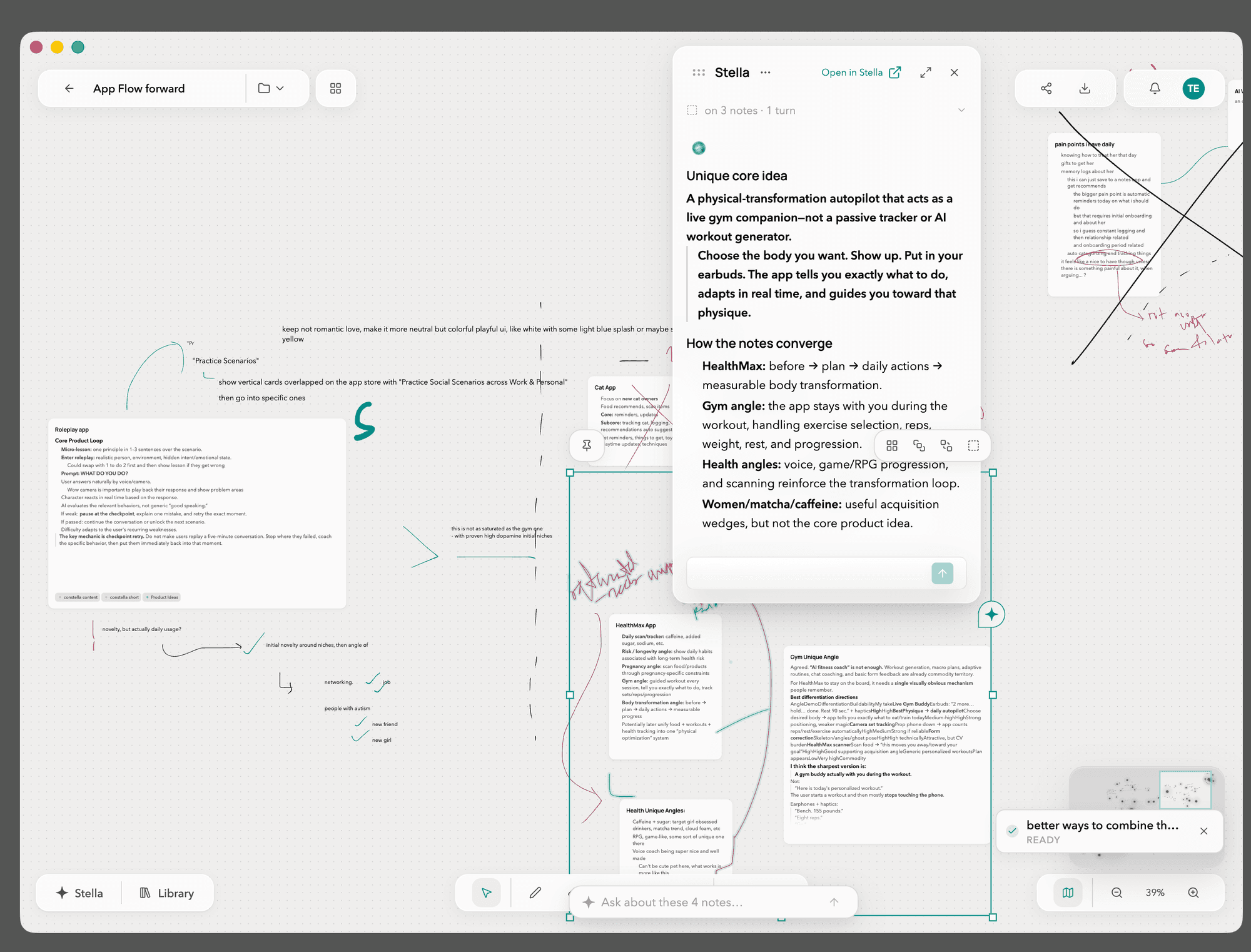
a Constella canvas with handwritten ink, sticky style notes, a floating Stella chat card over one note, and the Stella and library buttons in the bottom left.

Lines that mean something, and comments on any note.

a line between two cards can now say how they relate, and you can talk to stella right on a note.

  • give any line a type: supports, contradicts, builds on or example of. zoomed out, the line shows just its icon.
  • click a note with the comment tool to start a thread on it with stella.
  • generate is now build, with an ai note mode. build on this lives there, and build stays on after you place a card so you can keep going.
  • preview a template as a real canvas before you use it.
  • groups and shapes share one colour menu, with new section colours: honey amber, violet, green and stone.
  • a new canvas starts with an ai card and a blank note, and the ai card now drags, pins and resizes like any other card.
  • quote cards are now real notes, so they keep their source and their lines.
  • every new canvas starts with no template, and what the ai builds sits closer together and no longer lands on top of its own ai card.


Build on any card, and tools for creators.

a new build on this pill turns any card or group into an ai card that knows everything it is connected to.

  • hover a card or a group and press build on this. the ai card it makes reads the whole chain of cards that leads into it.
  • earshot, a new built-in plugin for creators, finds the tiktok, instagram and youtube videos doing best in your niche and helps you turn them into your own scripts.
  • creator templates like niche to videos give each step its own box, and fill with ai works on one box at a time.
  • the template gallery opens full screen, with bigger previews.
  • onboarding starts by asking who you most identify with, and the canvases it suggests follow your answer.
  • canvas ai runs show in the background tray, so you can leave and come back to them.
  • the app is now less than half the size. the local ai models are gone, everything runs in the cloud, and old model downloads are cleaned up for you.
  • your sources and your claude code and codex connections sit right next to share on every canvas.

A new way to start, and a canvas that builds itself.

onboarding is new from the top: connect your stuff, watch it index fast, and land on a canvas made from your own notes.

  • a fresh start walks you through connecting your sources, indexing your notes and taking a quick tour, then shows what Ultra gives you.
  • the AI button on a canvas is now just Auto. one button, no picking a mode first.
  • the template chip opens the gallery straight away instead of a menu with one row in it.
  • in a journal, a name is underlined the first time it shows up, so you can see who it is at a glance.
  • dictionary pages say where a fact came from, and the repeated tag line is gone.

Your Claude Code and Codex now know everything Constella does.

open Constella and your claude code and codex connect to it by themselves: one connection gives them your canvas, notes, memory and connected apps.

  • they can start a new canvas for you and build on it, not just the one you have open.
  • a small check on their logos, top right, shows the connection is working. if it is not, you see why and can try again.
  • the download button in the web app now downloads the mac app right away.

The AI card is here for everyone.

every canvas now has the AI card: ask for something and it builds the canvas for you, in coloured sections with an insight on each.

  • the AI button sits on every canvas, and a new canvas can start from a topic. Constella AI does the work, no setup needed.
  • you no longer need memory turned on to use the AI card.

AI canvases that read like a picture.

when the AI builds on your canvas, every group is now a soft coloured section with a one line insight on top, so you see the point before the cards.

  • the AI can write straight on the canvas: big headlines, labels and short coloured callouts, which you can edit like your own text.
  • it uses your images too. pictures in your notes show up with what is in them, not as empty cards.
  • it fits your screen. on a small window the picture grows down instead of off the side, and the view follows it while it draws.
  • it knows what day it is, puts newer notes first and says when something is old.
  • notes the AI writes stay out of your memory until you edit them. tables and charts no longer get cut off at the bottom.
  • home opens on your library.

An AI card that builds on your canvas.

place an AI card on a canvas, ask it something, and it gathers your notes and draws the answer: grouped ideas, quotes, links and a takeaway. it is rolling out to half of you this week.

  • pick who does the work: Constella AI, or the Claude Code or Codex already on your Mac. Claude Code and Codex also pull from the tools you connected to them, like analytics, docs or issues.
  • two ways to work. Group Ideas finds your notes, reads them and groups them into a map. Auto does that first, then lets the AI decide what to make from it: notes, quotes, tables, charts or pictures.
  • a new canvas takes a topic on its start screen and builds from it the same way.
  • the answer lands as a normal card with questions to ask next. pick one and a new AI card is ready beside it.
  • while Constella is open, any Claude Code or Codex session on your Mac can find one of your canvases and draw on it.
  • in the Ask field you can pick newer models, or answer with Claude Code or Codex.
  • lines can have arrows, and comment pins on the canvas have a new look.
  • cards the AI writes grow to fit their text instead of cutting it off.
  • a whole AI run is one undo, and Stop works at every step.

Gmail and Google Drive are back.

connect Gmail and Drive again. your emails, attachments and files land in your notes, open the way they should, and stay in sync on their own.

  • Gmail brings in your last 20 days of mail, skipping promotions and social. each email shows who sent it, when, and the full message, with a button to open it in Gmail. new mail shows up within half an hour.
  • attachments are listed on their email and open with one click. an attachment also links back to the email it came with.
  • Google Drive brings in your own files. Docs, PDFs, Word files and spreadsheets are searchable by what is inside them. files I cannot read, like zips and images, still show up by name.
  • files open for real now. PDFs open in the reader, Google Docs open in your browser, and anything else opens in its own Mac app. on the web, it downloads.
  • search results no longer show messy tracking links from newsletters.
  • the desktop app could get stuck syncing a big account the first time. it now finishes.
  • removed: automatic email drafts, recaps and reminders are turned off. nothing acts on your mail without you asking.

ask Stella about the notes you select. shapes and text are finished.

Stella now answers inside the canvas, scoped to whatever you point at. shapes, text and resizing got their final rules, and recall is one keypress away.

  • select one or more notes and ask a question. you get a floating thread card you can drag, resize and pin next to the notes it came from. threads are saved to your account. if a note is empty, Stella says so instead of guessing.
  • the shape tool has rectangle, ellipse and line. pick line and an arrowheads option appears, none or end, and the canvas remembers your choice. drag to draw a shape. a plain click only deselects. hold shift to snap a line to 15 degree steps. after you place one, the tool stays armed so you can keep going.
  • text comes in small, medium and large, with the same five colours as the pen: ink, teal, amber, blue and rose. click to place it, or drag to set the wrap width. resizing changes the box, never the font. double click a box to fit its height.
  • corner handles resize freely. hold shift to lock the proportions. middle handles stretch one side. this works on ink, shapes, lines, text boxes, and the frame around a multi selection or a group.
  • press / on the canvas to recall. files open in floating reader windows you can move around, and pinned answers are movable windows too. you can export a canvas as markdown, an html mind map or a png.
  • library search and recall now rank the same way. an exact word match always beats a "sort of similar" match. if you type a phrase you remember writing, that note comes first.
  • drop a .txt or .md file on the canvas and it becomes a readable note. files dropped on the web app keep their summary when you edit them.
  • removed: the "add a web clip" row in integrations. it never worked reliably. clipping stays in the chrome extension.
  • pressing / no longer opens two overlays. a Stella turn that never sends now fails clearly instead of spinning forever.

one dock row

every canvas tool now sits on a single row at the bottom of the board. the ink, build and gather mode switcher is gone.

  • the dock, left to right: select (V) with pan (H) tucked inside it, draw (B), erase (E), shape (R), text (T), recall (/), search memory, then undo and redo.
  • hold space to pan at any time. cmd Z and cmd shift Z undo and redo. cmd C and cmd V copy and paste, and pasting text makes a new note.
  • removed: the ink, build and gather mode switcher. there is one canvas mode now. recall and search memory moved next to text so the whole toolkit is one row.
  • the web app now offers the mac app and the chrome extension.

one library, and the canvas learns to draw

everything you have saved sits in one grid. in the same two weeks the canvas got a pen, groups, arrows, layering and a share link.

  • the library grid. notes, pdfs, images, canvases and records from your connected apps in one view. group by canvas or by time, filter by kind, and open a side panel with tags and connections for whatever you pick.
  • a scroll rail on the right jumps by month. drag it to scrub through years of notes. pages load as you go.
  • the pen has three sizes, fine, medium and bold, and three stroke assists, freehand, smoothed and lines. hold shift mid stroke to make it straight. five colours: ink, teal, amber, blue and rose. your pen setup follows you across canvases and devices.
  • the eraser removes whole strokes or just the pixels you touch.
  • cmd G groups notes, shapes, text and ink together. cmd shift G ungroups. move, pin, rename, organize or ask Stella about a group as one thing. ink joins a group as a cluster and comes back unchanged when you ungroup. alt drag duplicates. each group step is a single undo.
  • select a line between notes to switch it between plain, one way or two way, and flip its direction. drag an end onto another note to re-aim it. connecting two notes that are already connected selects the existing line instead of making a second one.
  • marquee or shift click to select several things. a floating bar appears just outside the selection with pin, organize, bring forward, send backward, group and an ask field.
  • ] and [ move overlapping items one step. cmd ] and cmd [ jump to the top or bottom. a minimap in the bottom right pans the board.
  • share a canvas. send a viewable link with a public preview, and take it back with one unshare click.
  • Stella lives in a pill at the bottom left of the canvas. answers can be pinned to the board next to the notes they came from.
  • spelling. misspellings get the native red underline in every editor, with right click suggestions. words you add to your dictionary follow your account. there is a new writing tab in settings.
  • type #idea in a note or in the quick capture overlay and it is tagged. duplicate tags were merged.
  • removed: ai auto connections. Constella no longer draws links between notes on its own, and the quota pill and upgrade prompt for it are gone. connections are the ones you draw or the ones Stella cites.
  • removed: the old Stella orb and the chat panel it opened inside a project. the dock replaces both.
  • the library and settings work at phone width on the web. the canvas shows a friendly "open this on desktop" note.

quiet paper is the only canvas

the calm paper canvas went from a developer preview to everyone. in the same week i took out a lot of settings and switches that no longer earned their place.

  • quiet paper for all. subtle note cards on soft paper. the split discovery canvas, with its recall pane down the side, is retired. recall is a tool on the dock and drops a gather node that pulls in related memories.
  • open files inside the app. pdfs, images and records from connected apps open in a movable reader window, with download and open original actions. if a file is not backed up yet, you see a retry badge instead of a silent gap.
  • base is now starter: $7.99, two integrations, 1,500 ai credits. ultra, $19.99, is the plan for unlimited integrations. settings gained a usage section and a language picker for speech and ai. if a plan lapses or a free account hits its cap, sync pauses and the app tells you plainly.
  • removed: ai config, the local model download row, and running Claude Code or Codex as Constella's engine. before, Constella could run the Claude Code or Codex command line tool under the hood to power its own chat. that only worked on mac and linux, so it went. the other direction stayed: your Claude Code or Codex can still use Constella as memory through bring your brain. local search still runs quietly on every mac.
  • removed: the Google Drive, Gmail, Calendar and GitHub rows in the integrations panel. Drive and Gmail can still be connected from the new canvas dialog. Calendar and GitHub are gone.
  • removed: post signup onboarding, the note tag editor and the assistant tab. new accounts land straight on the library. in the note expand view the tag editor and the per note assistant tab are hidden for now, so the connections rail is always in view.

iMessage and Apple Notes come in. the old home goes out.

two big imports arrived. then on july 12 one release cleared the home screen of everything that was not your library or a canvas.

  • iMessage and Apple Notes import. connect them on mac and the messages and notes become searchable memories. each connected app gets its own coloured spine on its cards so you can tell a text from a note at a glance.
  • frontier reasoning in Stella. a toggle in full window chat that switches to a stronger, slower model for the hard questions.
  • the bring your brain cards for Claude Code and Codex now point at Constella's cloud endpoint. setup is one command, and it works from any machine, not only the mac running the app.
  • removed: agents. the agents overlay let you pick a template, deploy a named agent, chat with it, edit its workflow, run it on a schedule and browse its memories. it shipped on june 4 and i took it out on july 12.
  • removed: the insights, graph, connections and discoveries tabs. the tab strip across the top of home, and the discoveries feed of ai found links, are gone. home is the library.
  • removed: the alerts rail, the memories, feed and chat switch, and the local setup card. all of these were unmounted between july 12 and july 26. folders now import from the new canvas dialog.

Stella gets a full window

chat used to squeeze into a side panel. now cmd K, then tab, opens Stella across the whole window.

  • full window Stella. chat over your whole memory. conversations are saved, a failed reply can be retried, and any answer can be dropped onto a canvas with its formatting kept.
  • removed: the big ask box at the top of home. hidden on june 27. asking now lives in cmd K.
  • removed: daily feed and jarvis. a daily recap with reminders, meeting briefs and to dos was built on june 23. its jarvis tab was switched off the same day, and the feed lost its last switch on july 12. neither is reachable today.

the sidebar and the memories tab go. local search and bring your brain arrive.

this is the first big cut. the left sidebar, the greeting home and the memories canvas were all removed, and the top bar took their place.

  • bring your brain. a pill in the top bar that plugs your Constella memory into the assistants you already use, over mcp, the open standard for giving ai tools access to data. cards for Claude Code, Codex, ChatGPT and self hosted apps like Open WebUI, LibreChat, Cline and Continue. each card walks you through setup and has a copy button with your key already filled in.
  • a connected assistant can search your notes, read one in full, list recent notes and your tags, save a new note or a pdf into Constella, and see which folders you have indexed. on the mac app the server runs on your own machine behind a private token, so nothing leaves the laptop unless you choose the cloud endpoint.
  • local search that works offline. a small embedding model loads on your mac at launch, so searching your notes works with no internet. it runs silently. nothing to configure.
  • plans you can change yourself. upgrade, downgrade and cancel in the app. no paywall the moment you sign up.
  • removed: the left sidebar. home, notes and memories navigation and the plan card left on june 1. a top bar with index your data, bring your brain and settings replaced it.
  • removed: the greeting home. the big greeting with an ask box, a results panel, a memories preview strip, the daily insights card and the daily brief modal all went on may 31.
  • removed: the memories tab. the canvas of ai "insight" nodes sorted by category left home on june 1. its last door, inside the recall overlay, closed on june 10. what you saved lives in the library now.
  • the local cache moved to sqlite and only one ai model stays in memory at a time. deletions are tracked so a removed note does not come back after sync. onboarding was trimmed to two questions.

where it starts

the "recall across your sources" box left the home screen. Google Drive import came back, and the chrome extension can sign you in through the web app.

everything that went away, in one place

four months ago Constella was a home screen with agents, automations, memories and feeds. today it is a library and a clean canvas with Stella on it. this is the full list of what i took out on the way.

home and memories

  • the "recall across your sources" box may 13 now: the recall tool on the canvas dock, and /.
  • the greeting home with its ask box, results panel, memories strip, daily insights and daily brief may 31 now: home is the library grid.
  • the left sidebar with home, notes, memories and the plan card june 1 now: a top bar with index your data, bring your brain and settings.
  • the memories tab of ai insight nodes by category june 1 to 10 now: the library.
  • the ask hero box on home june 27 now: cmd K, then tab for Stella.
  • the home tab strip with insights, graph, connections, library and discoveries july 12 now: one library view grouped by canvases or by time.
  • the memories, feed and chat mode switch july 12 now: no modes. library and canvas.

agents and automations

  • the agents overlay with templates, deploy, chat, edit workflow, schedule, agent memories and share a workflow july 12 now: nothing. it shipped june 4 and was out five weeks later.
  • the alerts side rail july 12 now: nothing.
  • the daily feed recap and jarvis june 23 to july 12 now: nothing reachable. built and shelved.

ai features

  • the ai config tab in settings july 18 now: the ai and plan tab.
  • the local and cloud picker, the local model download, and Claude Code or Codex as Constella's engine july 26 to august 5 now: local search runs silently. your Claude Code, Codex, ChatGPT or self hosted assistant reads Constella over mcp via bring your brain.
  • the old Stella orb and the in project chat sidebar july 19 to august 16 now: the Stella dock at the bottom left of the canvas.
  • ai auto connections and its quota pill august 9 now: connections you draw or Stella cites.
  • the note tag editor and assistant tab in the expand view august 3 now: the connections rail, always shown. marked temporary.
  • the recall side pane and recall pins august 5 now: recall on the dock. inquiry pins on the canvas.

canvas modes

  • the split discovery canvas august 5 now: quiet paper.
  • the ink, build and gather mode switcher august 26 now: one dock row: select, draw, erase, shape, text, recall, search memory.

integrations

  • the Google Drive, Gmail, Calendar and GitHub rows in integrations august 6 now: Drive and Gmail from the new canvas dialog. Calendar and GitHub are gone.
  • the local folders dialog july 26 now: folders import from the new canvas dialog.
  • the "add a web clip" row september 6 now: the chrome extension.

plans and onboarding

  • the base plan august 5 now: starter at $7.99. ultra at $19.99. mega and early accounts are grandfathered.
  • guided onboarding after signup may 27 to august 2 now: trimmed to two questions, then switched off. new users land on the library.
TS Tejas Sharma
dates are release dates from the desktop app's version bumps.